Refractive Index
Refractive-index Curves
Configure refractive-index curves shown in the center panel. You can display defined indices (substrate, protective layer), imported indices, and fitted indices.
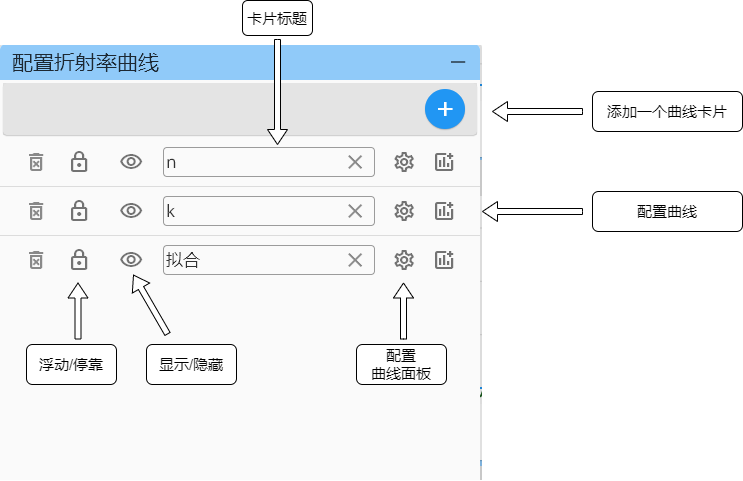
For card-panel settings see: Card panel settings
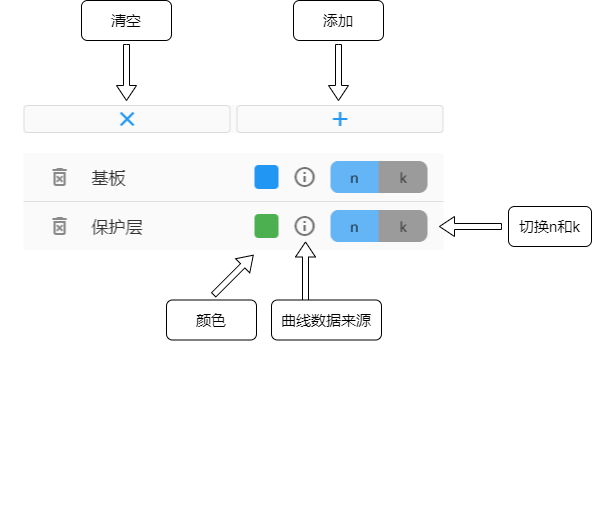
Click Color to change curve color.
Click n/k to switch between refractive index n and extinction coefficient k.

Import Refractive Index
Users can import refractive-index data for comparison and analysis.

Click the right-arrow button of each entry to open Refractive-index Editing Table.
Refractive-index Table and Material Upload
The refractive-index table is the correct place for tabulated-material operations.
Typical actions here are:
- Edit wavelength-point
n/kdata - Import a tabulated material from the material library
- Upload the current table as a tabulated material
This page should be treated as a table-data workflow.
If you need to preserve model type and model coefficients, use the model parameter editor instead of the table upload path.
User Reminder
Use the refractive-index table when the main object you want to keep is the wavelength-point data itself.
Use the model-material editor when the main object you want to keep is the dispersion model structure.
See also: