Fitting
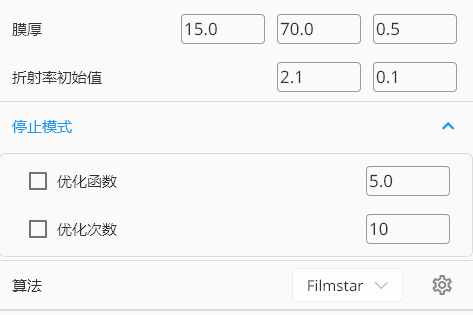
1. Thickness
- Start thickness
- End thickness
- Thickness interval
2. Initial Values
- n
- k
3. Stop Criteria
Defines conditions to stop a fitting run.
3.1 Objective Function
Stop when the objective-function value is below the configured threshold.
3.2 Optimization Cycles
Stop when the configured optimization-cycle count is reached.
4. Algorithm
Currently only Filmstar built-in algorithms are supported.
5. Spectrum Target
Photometric fitting uses film stack, layer thickness and refractive index to match spectrum targets, so a valid spectrum target is required.
See Spectrum Target.
Client UI Notes
- The OSC client application includes interactive validation and diagnostic panels. Diagnostic and validation text areas are selectable across multiple lines and the client provides a "copy" action to copy the full diagnostic or validation text to the clipboard.
- When preparing user documentation or screenshots, use the client's screenshot automation or capture the active window; example developer scripts and guidance are available in the repository's developer docs (
osc_dev_doc/UI_TESTING_AND_SCREENSHOT_AUTOMATION.md).